


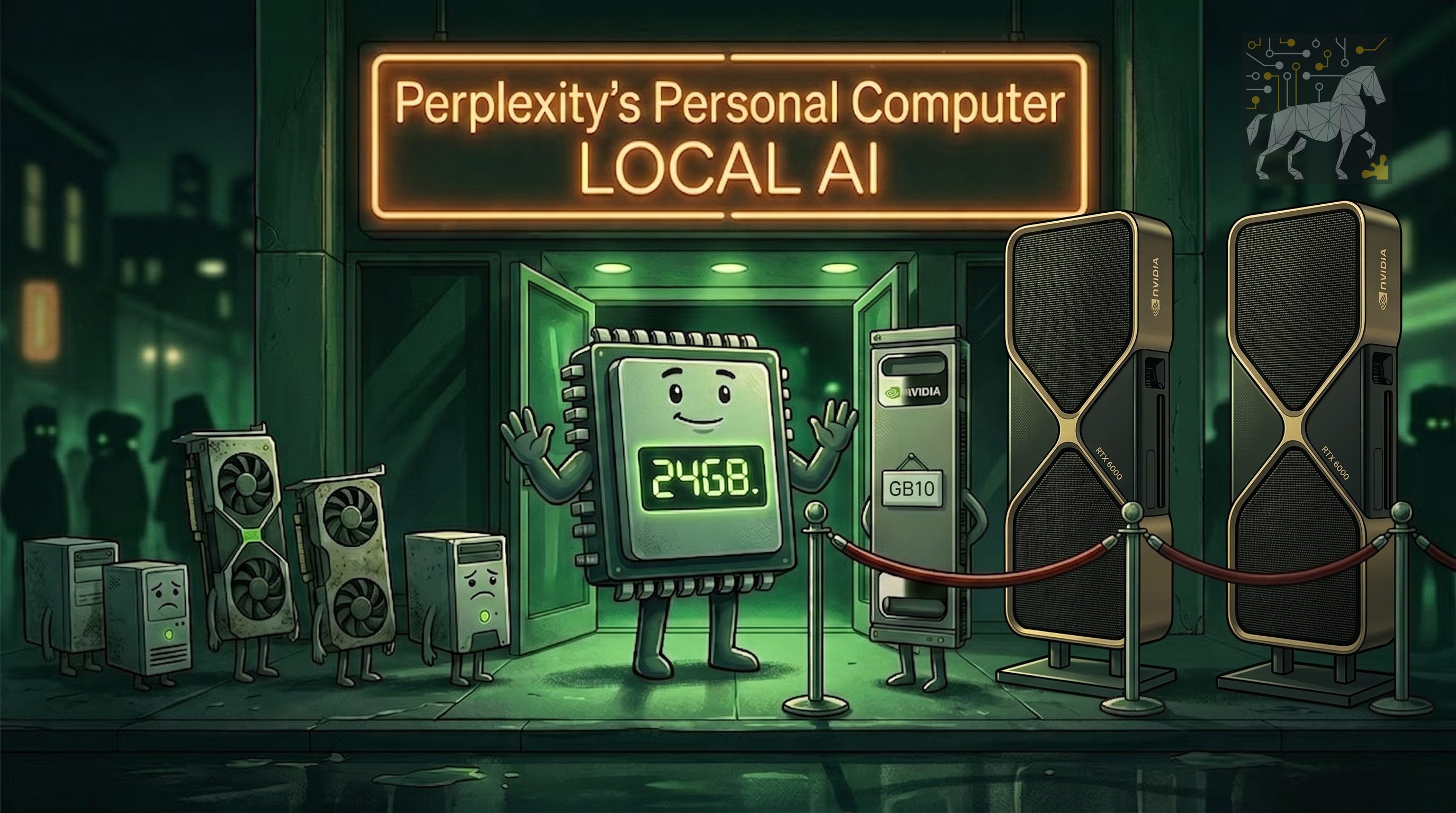
I was in the room for the Nvidia and Perplexity briefing on August 24, the day before Perplexity’s Personal Computer went live. No slides full of benchmark bar charts, no executive doing a victory lap — just a walkthrough of a feature called Portable Computer, running a Qwen model locally on a DGX Spark. And about ten minutes in, I had one of those “wait, they actually built it” moments. Being a Workstation expert, I have always been a fan of powerful local compute, serving users as much as possible, before the demand for compute is so big, you have to go to servers, on-premise or in the cloud.
I’ve spent a good chunk of the last year on this Substack arguing that the future of AI on workstations isn’t “run everything locally” or “send everything to the cloud” — it’s Tokenomics: run as many tokens as you can locally, where they’re cheap and private, and only pay for cloud tokens when the task actually demands frontier-model capability. And if this is the case, you, the user, decide what information leaves your private environment.
Portable Computer is the first time I’ve seen a major AI player ship that exact idea as a product, with a specific, deliberate memory threshold baked into the design. So let’s get into it — what it is, who it’s actually for, and what the 24GB floor means once you stop thinking about it as a spec and start thinking about it as a workload decision.
Thanks for being here! Please share this report with a AI practitioners who like controlled costs, private and sovereignty over their data. Thanks!
What actually launched
Nvidia and Perplexity announced Portable Computer, a Perplexity feature that runs AI models directly on local hardware instead of exclusively in the cloud. At launch, it supports Qwen 3.8 27B and Qwen 3.6 35B, both post-trained specifically for this use case to improve accuracy over the stock versions of those models. Nvidia Nemotron 3.5 Lightning is coming soon. The demo I saw ran Qwen 3.8 27B DFlash2 on a DGX Spark, comfortably local, comfortably fast.
You need a Perplexity Pro or Max subscription to use it — that part doesn’t change whether the model runs on your machine or reaches out to the cloud. As of this writing, Pro runs $20/month and Max runs $200/month, per Perplexity’s pricing page.
Here’s the number that actually matters, though, and it’s not the parameter count.
The 24GB line is the real headline
Nvidia and Perplexity sized these models to fit inside 24GB of GPU memory. That’s not an arbitrary number — it’s the floor across a genuinely wide swath of Nvidia’s hardware, from the DGX Spark (Nvidia’s compact AI supercomputer built on Grace Blackwell and the GB10 superchip) down to RTX Pro workstation cards, and even one consumer card: the GeForce RTX 5090 at 32GB, the only GeForce part that clears the bar.
That’s a deliberate bet. Instead of tuning separate model sizes for separate hardware tiers, Perplexity picked one memory ceiling low enough to hit a huge range of machines with a single release. I respect that. It’s the difference between designing for an aspirational flagship SKU and designing for the actual installed base of people who’d use this thing — which, if you’ve read anything else I’ve written here, you know is basically my entire premise.
The 24GB floor is doing something specific here: it’s setting the minimum workload capability for participating in this hybrid system at all. Below that line, you’re not invited — you’re cloud-only, full stop, for this feature. At exactly 24GB (i.e. Nvidia RTX Pro 4000 tier), you get in the door, but you’re running one model, one context window, little headroom. That’s a perfectly legitimate tier for someone who wants Qwen mid-size running locally and nothing fancier.
Where it gets genuinely interesting is the DGX Spark. In the demo, it was running at roughly 80% of its 128GB of unified memory — which means fitting the model was never the hard part. What you ask the model to do costs memory too, and people underestimate that constantly. With roughly five times the memory these models need, the Spark isn’t a single-model machine, it’s an agentic-workflow machine: multiple models loaded, working together, with real context window headroom. That’s a different workload category entirely from a single 24GB card, even though both technically “run Portable Computer.”
And the cards in between — the 32GB, 48GB, 72GB, 96GB tiers on Table 1 — aren’t just “faster.” They’re buying you workflow flexibility: room for a second model, more context, more simultaneous work, without jumping all the way to Spark-class unified memory. If you’re advising a customer on which of these to buy, “which one is fastest” is the wrong question. “What workload are you actually running, how many models does it involve at once, how much context window is needed” are the right ones. This is the exact spec-comparison trap I’ve been harping on for a year: raw memory size and raw specs tell you almost nothing until you map them to a real workflow.
One more detail from the briefing that I think is underrated: Perplexity was explicit that model size isn’t just a memory-ceiling decision, it’s a responsiveness decision. A bigger model that technically fits in the Spark’s 128GB doesn’t automatically mean a better experience in terms of responsiveness, please read: “tokens per second.” Headroom doesn’t mean “always load the biggest thing that fits.” That’s a genuinely mature way to think about local AI performance, and it’s rarer than it should be.
The hardware, in full
I want to show you the complete picture here, not a condensed version, because the tiering across this lineup is the whole story.
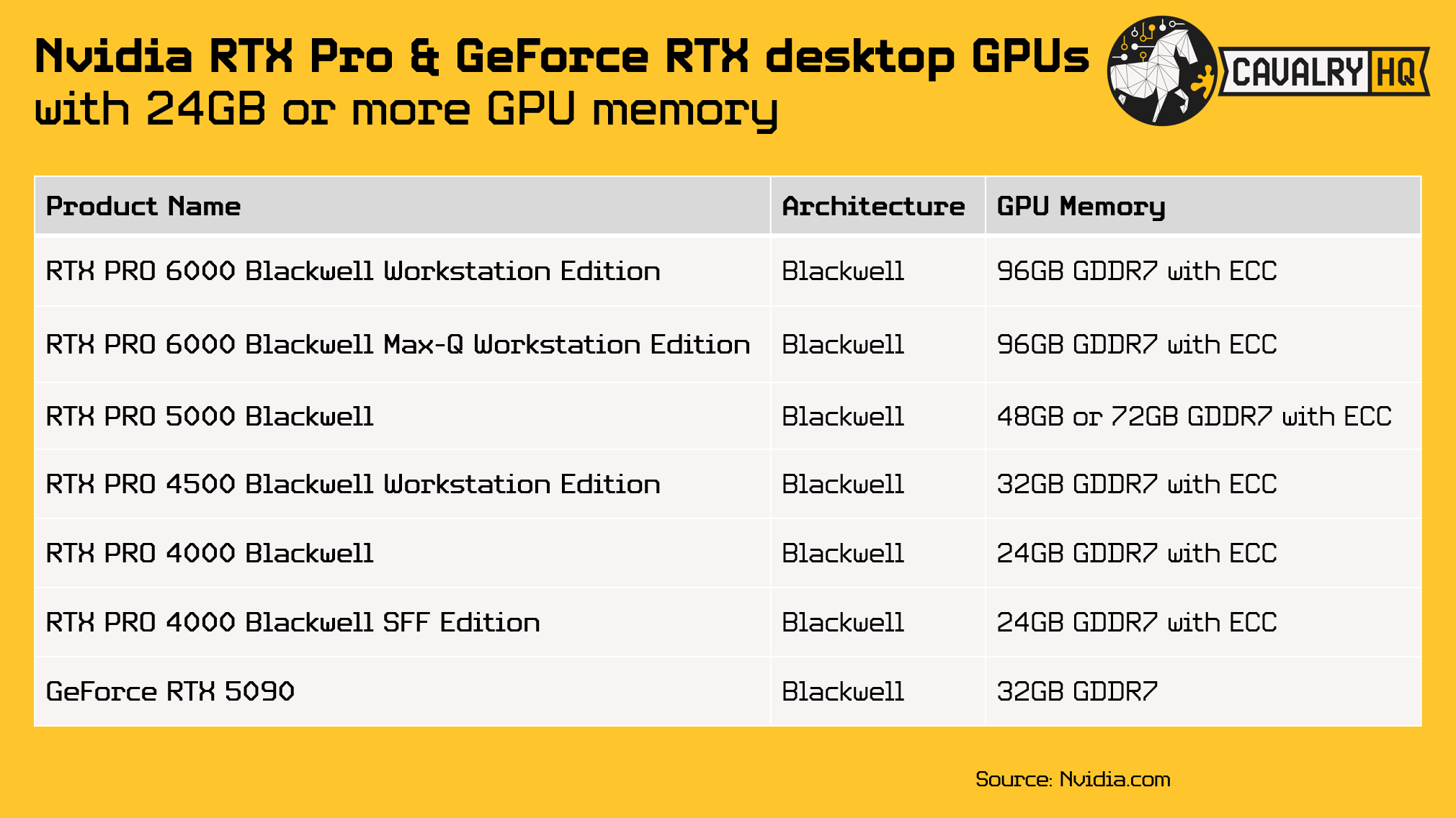
Table 1: Nvidia RTX Pro and GeForce RTX desktop GPUs with >= 24GB GPU memory
Sources: Nvidia RTX Pro workstation GPUs1; GeForce RTX 50 Series2
When it comes to the workstation in the center of this announcement, the Nvidia DGX Spark, here are all the available variants of this platform from Nvidia and other PC OEMs:
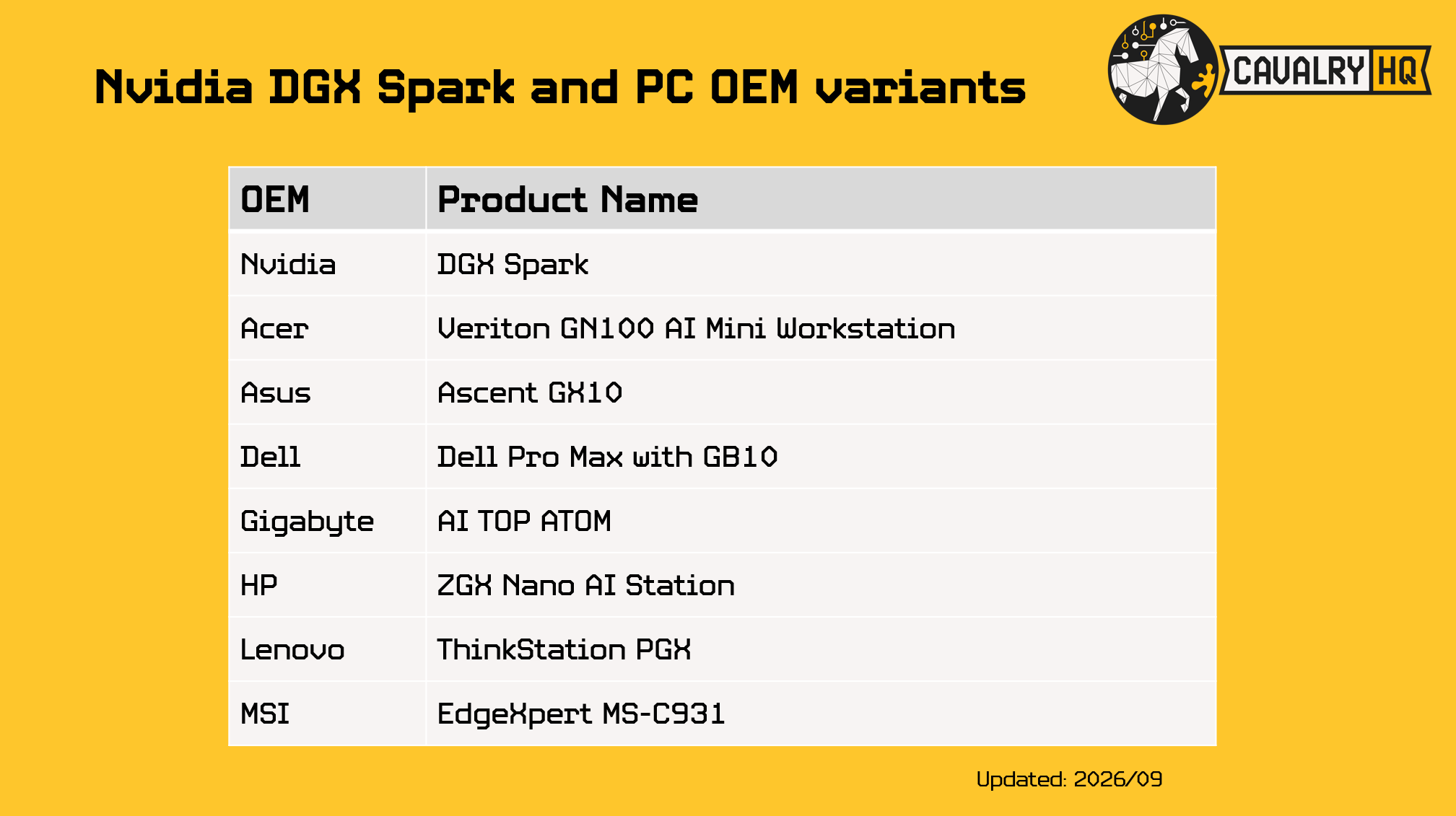
Table 2: Nvidia DGX Spark and PC OEM variants
Source: Nvidia DGX Spark3
A quick honesty note, the kind I try to always include: the tiering analysis in this article is mine, not Nvidia's official recommendation. I've limited it to Blackwell-architecture cards, though it's entirely possible Portable Computer runs fine on earlier architectures too — that wasn't confirmed in the briefing either way.
Where this actually lands in the Tokenomics framework
Okay, here’s where I put my analyst hat on and stop just describing the announcement.
Go back to how I define a workflow: Import → Loading → Active Editing → Export, built from a sequence of specific, repeatable workloads. Portable Computer doesn’t change that framework — it changes what’s economically rational to run at the “Active Editing” stage for an AI-assisted workflow. Every prompt you run locally is a token you didn’t have to pay cloud rates for. Every prompt that genuinely needs frontier-model reasoning, you send out. That’s Tokenomics, not as a slogan, but as an actual dollar-and-cents decision baked into your hardware choice.
Let me be clear about that first point, though, because I try not to let a good thesis talk me out of good math. The financial case for running models locally really only breaks in your favor under very high utilization — go check your own cloud token bill before you assume local hardware pays for itself. If you’re an occasional user, cloud tokens are still cheaper than a dedicated GPU sitting there depreciating. But privacy and control over your data are a stronger reason for a lot of people, and I’d argue that’s especially true for SMBs, who depend on sensitive IP and confidential assets they simply can’t send to a third party’s servers no matter how favorable the pricing looks. That’s a decision that doesn’t show up on the utilization spreadsheet at all, and it shouldn’t have to.
Hybrid AI — running everyday needs locally and privately at predictable cost, while reaching out to frontier models in the cloud only for genuinely high-complexity tasks — is the direction I think this industry is heading, and this announcement is a real, concrete step in that direction.
Strengths and open questions
What's working well:
The installation experience is the real unlock. Nvidia and Perplexity clearly put real effort into making this simple and transparent, aimed at domain experts who are not programmers or AI specialists. This is the “serve their frustrations, not their aspirations” principle in action — most of the addressable market for local AI isn’t only ML engineers, it’s CAD engineers, VFX artists, data analysts and experts across many workflows, who just want the thing to work.
The hybrid design is honest about its own limits. Rather than pretending a 27B–35B model can match a frontier model, Perplexity built the fallback-to-cloud path in from day one, with full user control over when that happens.
The OEM variant list is a genuine ecosystem play. Acer, Asus, Dell, Gigabyte, HP, Lenovo, and MSI all shipping DGX Spark variants means Nvidia is doing exactly what good platform enablement looks like: supporting OEMs with differentiated experiences that drive demand and preference for Nvidia-based devices, powered by Nvidia software ecosystem. This leverages the immense business network and manufacturing capability of PC OEMs.
What’s still open:
No clustering, yet. Perplexity confirmed it isn’t currently scaling this across multiple DGX Spark units, though it didn’t rule it out. It’s important to clarify that clustering systems doesn’t make sense for models of this size, however, clustering is still a very valid path for multi-agent workflows.
Windows support is coming in September. Portable Computer currently runs on DGX OS and Linux only. That’s a real gap for anyone hoping to run this on an RTX Spark laptop today. Mobile users can run Linux on top-of-the-line Mobile workstations, powered by Nvidia RTX Pro 5000 Blackwell Generation, like the Lenovo P16 series, HP Zbook Fury or Dell Pro Precision 7 series. All due for a refresh with the new Intel Panther Lake HX series processors.
DGX Station is untouched by this announcement. Qwen mid-size models don’t come close to needing that level of hardware. Whether Perplexity ever builds something that does remains an open question, not a roadmap commitment. Every in this announcement centers around the DGX Spark and selected workstation GPUs.
Conclusions
At CavalryHQ, I’m a big believer in local AI — not only for the lower total cost of ownership and the privacy it provides, but for the control and consistent performance it offers. The model, your files, and your prompts stay on your machine. You control what leaves it, when the cloud gets involved, and when cloud costs start accruing.
I’m glad to see this kind of enablement, even recognizing that the number of people with a 24GB-or-larger Nvidia GPU or a DGX Spark isn’t massive yet. This is the right way to start. I’d like to see Nvidia and Perplexity keep pushing that ceiling higher over time — toward larger, more capable models that can run locally, starting on the DGX Spark even at lower throughput, and eventually on higher-end hardware like multi-GPU RTX workstations and the DGX Station.
I also want to specifically credit Nvidia and Perplexity for prioritizing installation simplicity. Reducing the friction of downloading, installing, and maintaining a local AI model matters as much as the model itself. It opens this technology to a much larger group of power users across industries — people who are experts in their own fields but not in AI or software — and it makes hardware like the DGX Spark far more attractive to a much bigger addressable market.
And I’ll applaud Nvidia for working with a partner like Perplexity here, because this kind of enablement is exactly what helps PC OEM partners build demand for their own DGX Spark variants. It creates a genuinely good cycle, where the end user is the one who wins.
Next Steps
If you’re reading this because you’re actually weighing whether to run AI locally, don’t start with “which GPU should I buy.” Start with the two questions this article is really about:
What’s my utilization actually going to look like? If you’re an occasional user, be honest with yourself — cloud tokens will probably stay cheaper than a dedicated GPU depreciating in a closet. The financial case for local only clicks at real, sustained volume. Pull up your own cloud bill before you pull out a credit card for hardware.
How sensitive is what I’m feeding the model? If the honest answer involves client IP, unreleased designs, financials, or anything else you wouldn’t want sitting on a third party’s servers, that changes the math entirely — no utilization spreadsheet needed. This is where I see it matter most for SMBs specifically: you may not have huge token volume, but you also can’t afford a data-handling mistake.
If the answer points you toward local, the 24GB floor in Table 1 is your real starting line, and if you want a big context window, the DGX Spark’s is a better fit. Figure out which workload tier you actually need — a single model with no fuss, or something closer to an agentic setup with room for multiple models and real context headroom. Specs don’t tell you what you need, your workflow does.
I’ll also be digging further into this once Portable Computer is broadly available — installation, hands-on performance, and how it actually behaves running agentic workflows on Spark-class memory. Stay tuned.
And if you’re an SMB trying to work through this decision for real — sizing hardware against your actual workflow, weighing the privacy case against the utilization math, figuring out which tier you actually need instead of guessing off a spec sheet — that’s exactly the kind of thing I help people think through. Message CavalryHQ.
We need your help
In order to grow our mission to empower users with great tech, we need your support. These are a few things you can do to support us:
If you haven’t already, please Subscribe to this newsletter, there is a free option available or you can support this project with a paid option
Share this article with 3 people thinking about running AI locally
Like this article,
Repost it if you think it will help others
About the Author
This article was written by Hernán Quijano, Workstation Performance and Market Analyst at CavalryHQ. Our mission is to bridge the workstation industry and power users; improving guidance and removing technical roadblocks, so users unleash their talents focusing on accelerating software applications and workflows in Engineering, Media & Entertainment and A.I.
Disclaimers
Unless explicitly stated, this article has not been sponsored by any brand or organization | This article is not financial advice. The content is for informational purposes only. The author may own shares in companies mentioned, and readers should not consider this article a recommendation to buy, sell, or hold any assets.