



Be sure you have checked Part 1 of this report:
SideFX Houdini 21 Official System Recommendations
Source and credit for all screenshots below: sidefx.com/Support/system-requirements/
Note: Screenshots taken at date of writing of this report. We noticed that the look and feel of the website changed recently, but not the content, which is what we are focusing on this article.
Operating System
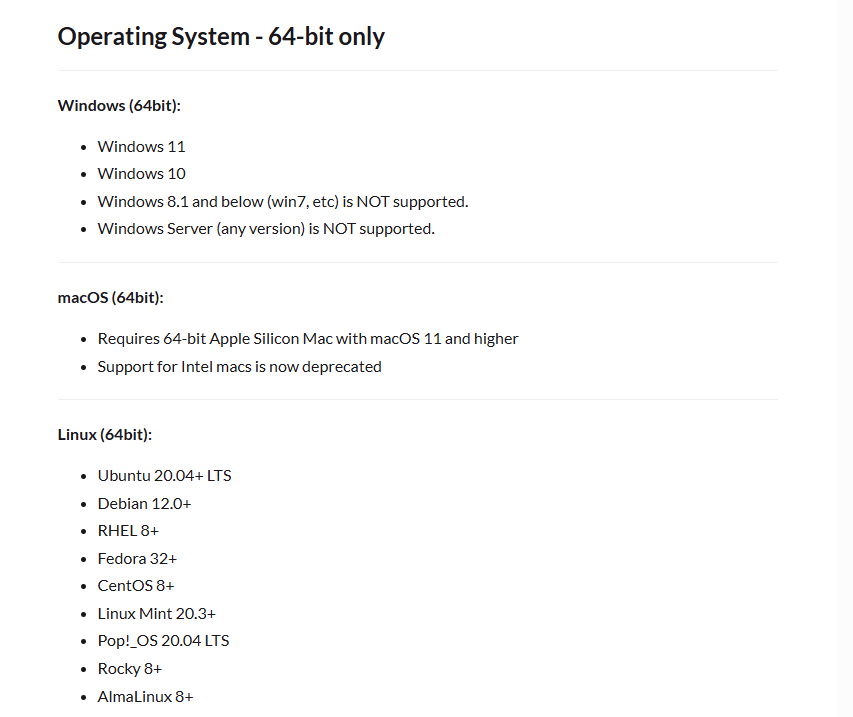
About Windows: Now that Windows 10 has reached End-of-Life (EoL), does it make sense for it to be supported? This has nothing to do with SideFX, so no problem on their part, but as a user, every day that passes using Windows 10 increases the exposure and risk on an unsupported Operating System, unless of course you are paying for the extra security maintenance. If you wanted an excuse to move to Windows 11, on fresh hardware or switch to a Linux distro, this is it.
About Linux: Even if Linux is the path, I’d stay away from some of the listed distros, specially CentOS for the same reason as Windows 10. For example, CentOS was EoLd in 20211. In fact, if we look deeper into Linux distributions, these are the current versions, vs the ones listed on SideFX’s site and when they were EoLd. It’s also recommended to follow the VFX Reference Platform guidance. By following this guidance, you know there are many users with similar configurations and if anything goes wrong, there will be a high priority to fix any problem. For more information, visit: https://vfxplatform.com/
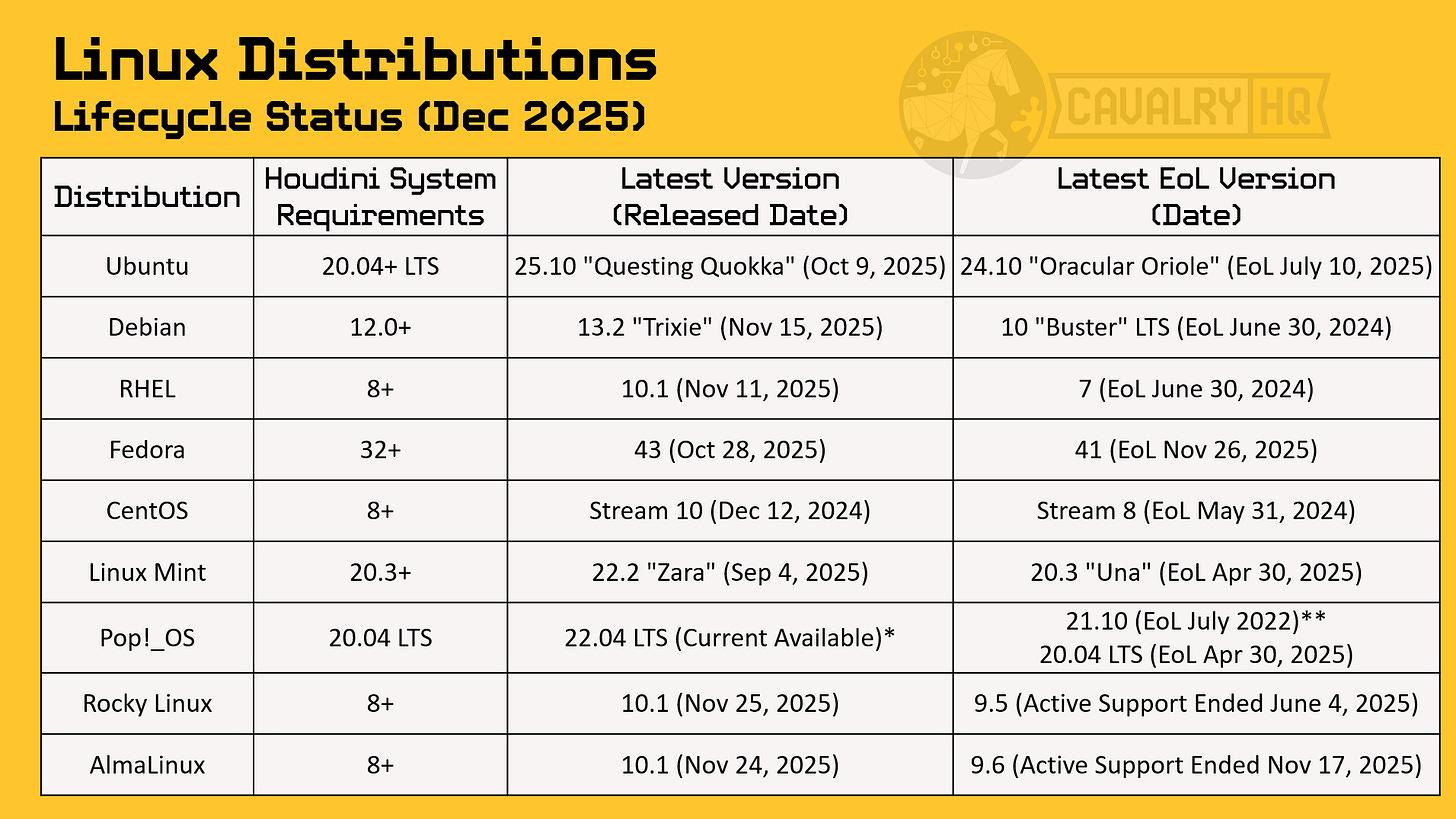
*Note on Pop!_OS: See footnote2
Regarding MacOS, Apple generally offers security updates and full support on the most recent 3 versions, so today, we would not recommend anything earlier than:
macOS Tahoe 26
macOS Sequoia 15
macOS Sonoma 14
… a far cry from the Minimum Recommended of macOS Big Sur 11
O.S. conclusion: Just because you can, doesn’t mean you should! Whether on Windows, Linux, or MacOS, O.S. selection should be current, at least for security reasons. It’s reasonable to apply a Minimum Common Requirement rule, so in this case, the minimum requirements of the desired <current> O.S. should overwrite the ones for the SW application. Nobody doing professional work should run it on outdated tech. If orders-of-magnitude more performance isn’t enough of a reason, security and support should.
Memory
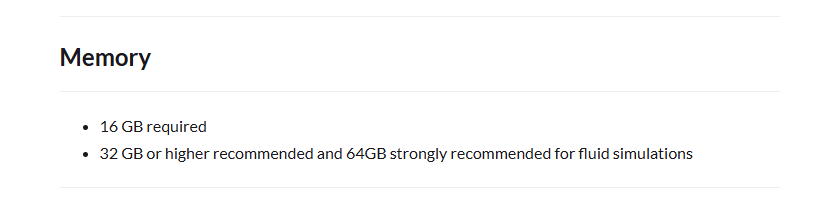
This should be read as:
less than 16 GB? don’t even try
16GB: you can install Houdini and start exploring it, maybe go through some tutorials with low/limited complexity
32GB: is the real minimum for a good experience, doing mid-complexity/polycount 3D scenes, but if you are planning to go beyond the basic features and get into high-complexity fluid simulations, you will need more, how much? RAM is like oxygen or money, everything seems fine until you run out of it.
It’s recommended that you open some of your most complex projects and as you work with it, observe on how much memory you are using. Nothing too sophisticated, simple tools like Windows’ Task Manager (Ctrl+Alt+Esc) can show you. i.e. My Mobile Workstation has 64GB of RAM, this is my Memory Usage right now, I’m using a bit less than half of my memory (27.5GB out of 64GB) and Houdini is not even open.

Always leave room for increased complexity of future projects, upcoming versions of Houdini, other applications you will be using in parallel, your O.S. needs and always plan for a buffer for unknowns.
Of course, this is easier said than done, considering the spike in Memory prices in the last few weeks. Having said that, having more than enough memory is critical since when your system runs out of memory and starts paging to your SSD, you will feel a significant impact in responsiveness and performance.

A final and very important note on memory:
Bandwidth! Houdini, and any other application calculating many particle simulations, needs to access massive amounts of memory in parallel. The amount of memory in your system (total capacity) will dictate how much information it can hold, it is the memory bandwidth what will dictate how much of that information can be accessed in parallel. Think about when you go to the supermarket and there are long lines at the registers to pay, there are 8 registers but only 2 are open, so you wish there were 4 or all 8 registers open, everyone found all the items they need, but only 2 customers can leave at a time! That is exactly what happens with memory bandwidth, when doing simulations there are thousands, hundreds of thousands or even millions of particles’ data to be loaded and computed, so you want to have as much memory bandwidth as you can. Not all applications need this, but Houdini definitely benefits from that big pipe of data. This is one of the key differentiators between different CPU Product lines, as shown here:

Perfect segway to discuss the next important component: the Processor.

Processor (CPU)

SideFX Houdini 21’s System Requirements Analysis - Part 3: CPU, GPU & Conclusions
Do you need help selecting the right Workstation for your Workflow or Professional Application? Ping me
We need your help
In order to grow our mission to empower users with great tech, we need your support. These are a few things you can do to support us:
If you haven’t already, please Subscribe to this newsletter, there is a free option available or you can support this project with a paid option
Share this article with 3 people you think will find it valuable. I appreciate introductions introductions into Houdini community owners in order to reach more users.
Like this article,
Repost it if you think it will help others
About the Author
This article was written by Hernán Quijano, Workstation Performance and Market Analyst at CavalryHQ. Our mission is to bridge the workstation industry and power users; improving guidance and removing technical roadblocks, so users unleash their talents focusing on accelerating software applications and workflows in Engineering, Media & Entertainment and A.I.
Disclaimers
Unless explicitly stated, this article has not been sponsored by any brand or organization | The author might personally own stock in one or multiple of the mentioned companies.
References:
https://www.centos.org/centos-linux-eol/
Note on Pop!_OS: While version 24.04 is impending (Dec 11, 2025), 22.04 remains the stable release today. Regarding EoL: Version 21.10 is the highest version number retired, but 20.04 LTS is the most recent retirement event (2025). Both are listed for clarity. Note on Enterprise Minors: For Rocky and AlmaLinux, the concept of “EoL” applies to minor versions immediately upon the release of the subsequent minor version, unlike Ubuntu LTS where point releases coexist.