



Be sure you have checked Part 1 & Part 2 of this report:
SideFX Houdini 21’s System Requirements Analysis - Part 1: Background, Benchmarks and Objectivity
SideFX Houdini 21’s System Requirements Analysis - Part 2: O.S. & Memory
Welcome to the third, final and most important part of these report! Thanks for being here! Please share this report with a few Houdini users you know or share it on your favorite Houdini User Community or Forum. Thanks!
Processor (CPU)
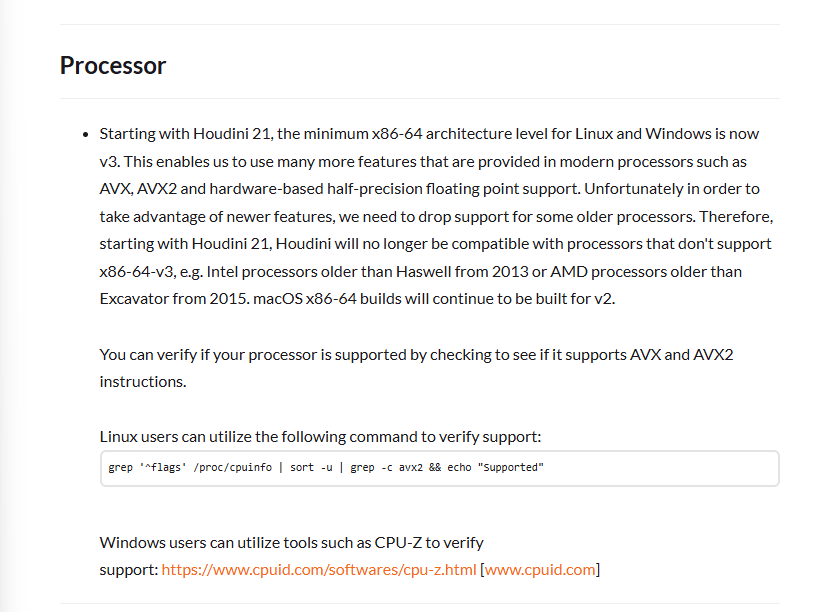
Processor is one of the most interesting ones, although that paragraph would give a nerd like me a great puzzle to solve, let’s make this simple.
What SideFX is saying above is:
Intel:
If you have a Core i5/i7 and its model is not 4000 series or higher, don’t run Houdini 21 on it. i.e. Intel Core i7-4770K was an amazing processor 12 years ago, I loved each one of its 4 cores and its high frequencies for 2013 standards.
AMD:
Excavator Architecture include Processors like Athlon X4 900 series and many AMD A6/A8/A10/A12 8000/9000 series. CPU World has a full list of all Excavator processors1
All these mentioned processors deserve a place in the Computer History Museum, we do not recommend to use any of them, why?
In the last 10-12 years, processors have become orders of magnitude faster, both in single threaded performance for 3D manipulation and multi-threaded performance for fluid simulation and rendering.
Modern processors are also way more power efficient
These old processors do not support Windows 11, so you are already exposed given Windows 10 EoL
And finally, I value your physical and mental health, you do not want the stress of getting anything meaningful done on this kind of hardware.
So what do we recommend:
For 3D modeling, animation and fast vector manipulation work, the super high single thread performance is a must:
Intel Core i7 or i9 Processors 12th gen or newer. The leap from 11th gen to 12th gen is so profound, that I do recommend 12th gen or newer. The state-of-the-art CPU here is the Intel Core Ultra 9 285K
AMD, the Ryzen 7 or 9 7000 series or newer are ideal. The state of the art CPU here is the AMD Ryzen 9 9950X or 9950X3D. The 3D cache should in theory help with latency for simulation, it’s just an educated guess at this point, I’d love to someday research it. Hey AMD, give me a ring if you are interested.
Please notice that these CPUs have been released in the last few years, 7 to 12 years newer than the ones recommended by SideFX.
If beyond the 3D stuff above, you want to do fluid simulation, render cloning, Karma XPU rendering on 1 or multiple GPUs, the recommended CPUs are from higher end product lines like: Intel Xeon W and AMD Threadripper Pro.
Mid-tier:
Intel Xeon W-2595X (up to 26 cores)
AMD Threadripper Pro 9965WX (24 cores)
Top-tier:
Intel Xeon W-3595X Series (60 cores)
AMD Threadripper Pro 9985WX (64 cores)
What about the Threadripper Pro 9995WX with 96 cores? Early tests by Level1Techs.com2, suggests there is better performance even at such high core count, however, it’s important to find the right model, since 50% more cores will bring you 2% - 25% better performance depending on the test.
There is a lot that can be improved about how much we the tech nerds know about Houdini 21, however I’m not surprised that Puget Systems has the best analysis I have seen based on the simple benchmark from VFX Arabia plus their deep hardware expertise: https://www.pugetsystems.com/blog/2025/02/24/sidefx-houdini-performance-analysis-and-lessons-from-production/
A note about Qualcomm. It’s important to notice that although Snapdragon CPUs are innovative and power efficient, it’s completely unknown if they could run Houdini 21, even in emulation, since ARM architecture do not support AVX instructions. I’d love see at least a blog from Qualcomm and SideFX covering any collaboration and enabling efforts.
Graphics Cards (GPU)
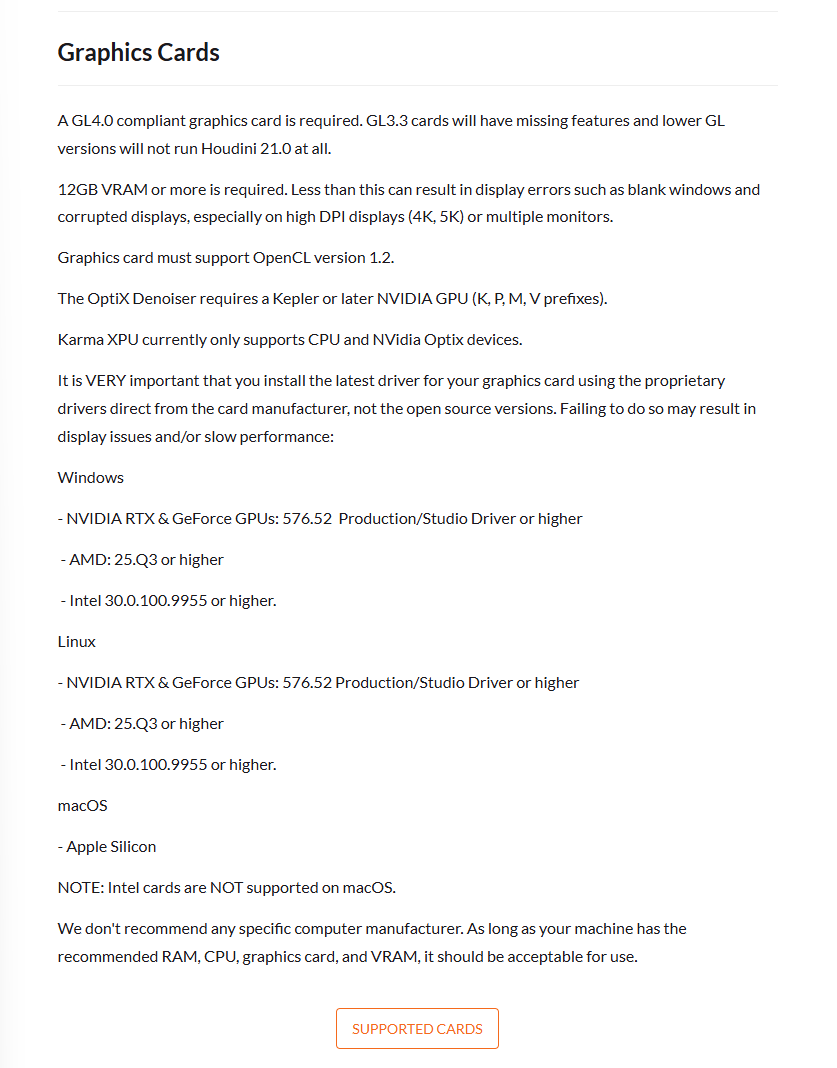
Let’s start with the GPU vendor that most people will use…
Nvidia
There is so much to discuss about the paragraph that SideFX dedicated to Nvidia. GL4.0 (do they refer to OpenGL?), >12GB VRAM, OpenCL 1.2, OptiX Denoiser support and all this just covers the functionality of Houdini, not the immense performance spectrum between all the GPUs that support these features.
The Nvidia Quadro K-series (Kepler family) were released in 2012-2013. Only the top of the line Quadro K6000 has the 12GB of VRAM required by Houdini. GPUs don’t launch every year, but when they do, the gen-on-gen performance is big enough to make CPUs be ashamed of their typical single digit improvements. GPUs typically go up >50% faster every generation. Sure, with high demand and limited competition, prices have gone up too. But enough talk about GPUs that are almost old enough to get a driver license.
We can go to the Maxwell generation (2015), where again, only the top of the line Quadro M6000 (12GB) and M6000 (24GB) would meet the criteria, but still these GPUs are obsolete.
Then comes Pascal (2016-2017) and this time, the Quadro P5000 and P6000, have enough memory and features, but compared to today’s standards, you can get the same performance at 1/20 of the price ($300 vs $6000), so let’s talk about what makes sense to buy today, so I’ll skip Volta & Turing (2018). All those are definitely obsolete. If you have an Ampere based card (2021-2022), specially the RTX A4000 or above and you are happy with it, it will work but the advances that have happened since are significant.
For a new workstation, you can try to find a good deal on an RTX Ada Generation supporting not only way higher compute, but all the SKUs have enough memory for Houdini from the RTX 2000 Ada (16GB) to the RTX 6000 Ada (48GB). As discussed earlier, if you are planning to do 3D work, 16GB is enough to get going, but when it comes to simulation, more memory and compute enables you to simulate bigger boxes, with more particles and way faster.
Finally we get to the NEW state-of-the-art Blackwell generation, definitely the obvious choice if you can find it and if you can afford it. If you are planning to render with Karma XPU or even a 3rd party renderer like the new Pixar Renderman XPU will benefit from a higher end model. I had the pleasure to attend the Renderman Art & Science Fair at Siggraph 2025 and they claimed that 98% of the Pixar scenes created so far, can fit in the 96GB that the Nvidia RTX 6000 Blackwell offers. Also, as we discussed on the Processor section, rendering in both Karma XPU or Renderman XPU will share the load with the CPU, so the fact that new powerful GPUs are available and enabled, doesn’t mean that these workflows won’t benefit from powerful high core count CPUs. A balanced system will always win!
What about AMD, Intel and Apple GPUs?
There is very little guidance from SideFX on GPUs from these vendor besides the fact that... “They work!” How well? are there other denoising libraries besides Nvidia Optix? maybe Intel Open Image Denoise (OIDN)3 ? Intel should work closer to SideFX to provide better guidance. After some investigation, I found this, deep into the Karma XPU documentation: “Karma currently ships with Intel’s OIDN fully functional out of the box”4. How is a user supposed to know this?
What about Apple? In our Foundry Nuke analysis, we found amazing performance scaling across Apple M-series SKUs and generations. Only a good comprehensive benchmark would show the impact of going from Pro to Max to Ultra SKUs from M1 to M5.
Skipped
Due to the length of this report, I skipped the following sections of the Houdini 21 MSRs, please let me know if you want me to go deeper in any of them
Disk Space
Input Devices
Monitor
Network
Remote Desktop Solutions
Conclusions
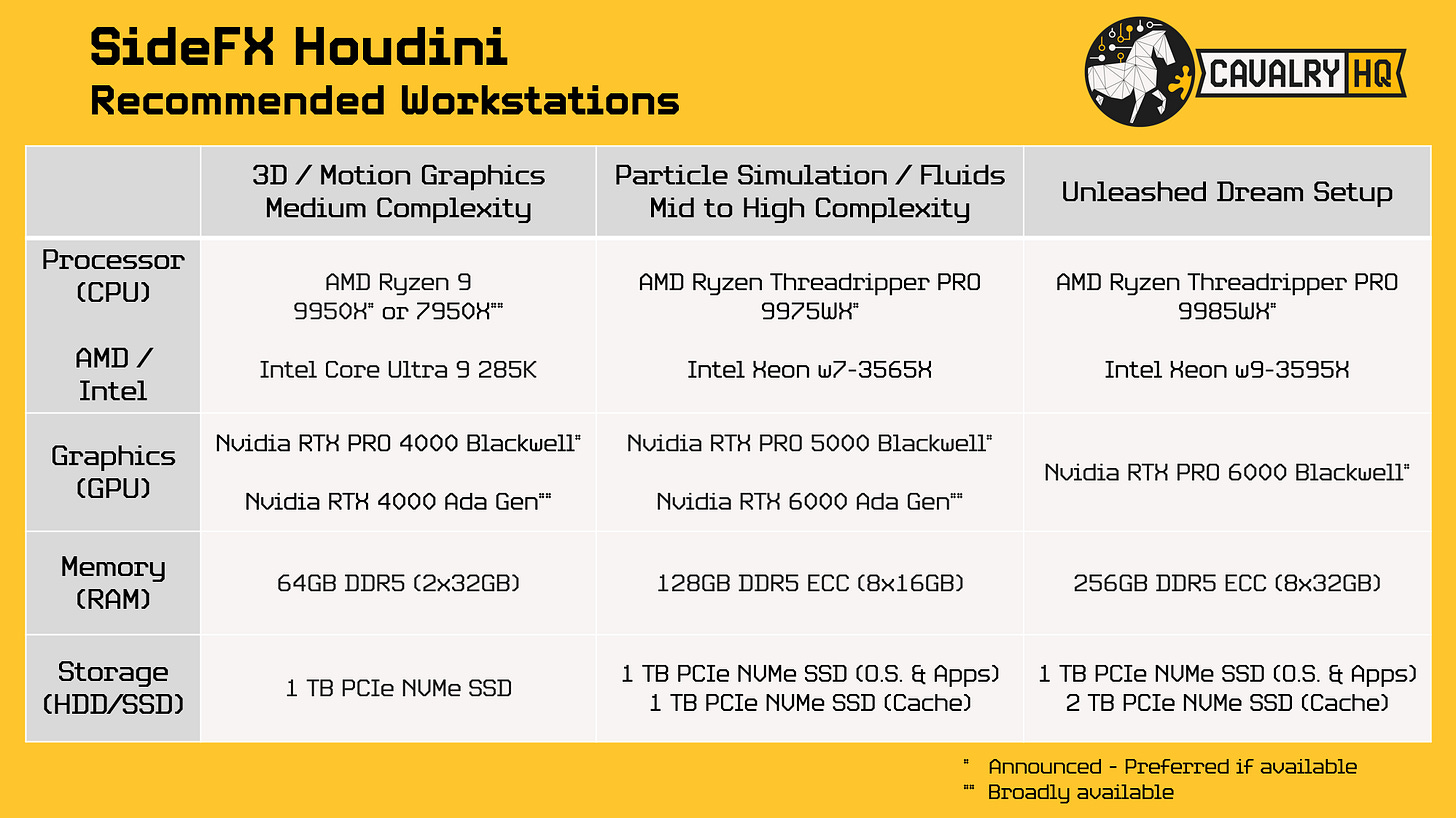
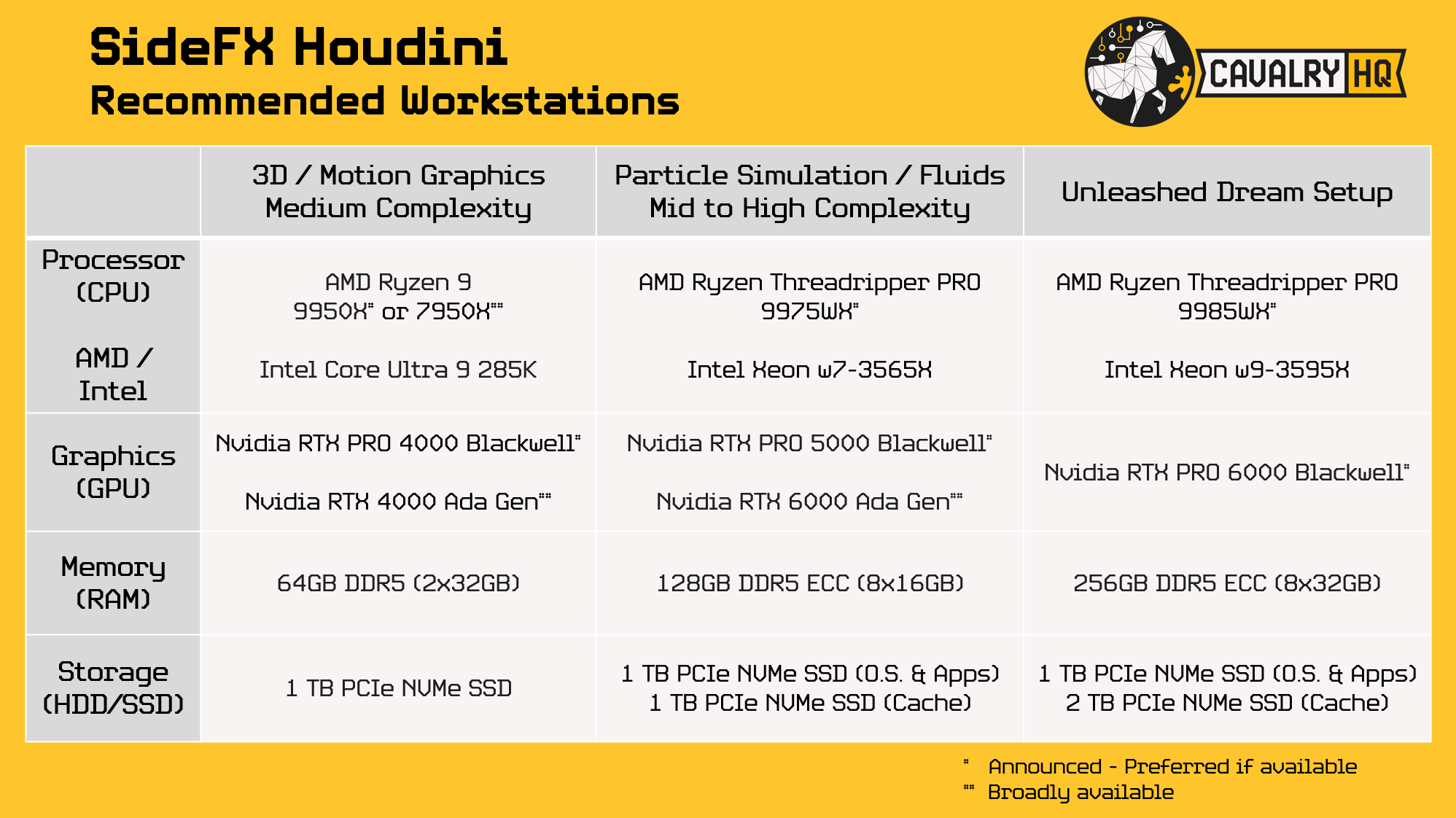
While it is a testament of the quality of Houdini’s code that run on ancient obsolete hardware, doesn’t mean that you should. If you value your productivity, the investment on your artists’ salaries and giving them room to experiment so your project has the best quality possible instead of good-enough, you should invest on a decent workstation. I’ll suggest three profiles, one for 3D and Motion Graphics, one for Simulation and, the dream setup we all want but can’t afford. I suggest you to use them as guidelines and adjust to your needs.
Next Steps
By working with SideFX and some of the XPU and Memory vendors above, I hope we can go deeper into Houdini with real world workloads to build a data-driven and objective analysis of the impact that each component has on Houdini workflows for procedural animation and simulation.
This would be a Herculean effort that I look forward to go through, in order to serve the Houdini users’ community. Please ping me if you have any interest in this effort or give me feedback on what you would like to see coming out of a project like this.
Do you need help selecting the right Workstation for your Workflow or Professional Application? Ping me
We need your help
In order to grow our mission to empower users with great tech, we need your support. These are a few things you can do to support us:
If you haven’t already, please Subscribe to this newsletter, there is a free option available or you can support this project with a paid option
Share this article with 3 people you think will find it valuable. I appreciate introductions introductions into Houdini community owners in order to reach more users.
Like this article,
Repost it if you think it will help others
About the Author
This article was written by Hernán Quijano, Workstation Performance and Market Analyst at CavalryHQ. Our mission is to bridge the workstation industry and power users; improving guidance and removing technical roadblocks, so users unleash their talents focusing on accelerating software applications and workflows in Engineering, Media & Entertainment and A.I.
Disclaimers
Unless explicitly stated, this article has not been sponsored by any brand or organization | The author might personally own stock in one or multiple of the mentioned companies.
References:
https://www.cpu-world.com/Related_CPUs/Socket%20AM4_Excavator.html
https://forum.level1techs.com/t/houdini-and-nuke-benchmarks/234361/17
https://www.openimagedenoise.org/
https://www.sidefx.com/docs/houdini/solaris/kug/noise.html